Types of search tools
By John P. Healy
1)
Subject
Directories
a.
Subject
directories are specialized Web sites that select other Web sites and organize
them under broad subject headings such as Art, Education, Recreation, and
science.
b.
You
can either browse under broad topics until you find the specific subject you
want or you can conduct a search within the subject directories using one or
more keywords.
c.
Subject
Directories are best when looking for
i.
A
popular topic (computer games, history of Baseball)
ii.
A
broad topic (art history as apposed to a picture of Leda and The Swan)
iii.
A
specialized database ( a Web site created by a subject expert or other
interested party who collects URL’s and makes them available from one Web page)
www.oz.net/~cyndihow/sites.htm
d.
subject
directories
iii.
www.about.com
iv.
www.go.com
2)
Search
Engines
a.
Search
engines, unlike subject directories, are comprehensive indexes of the
internet. While there goal is to have
every word of every Web page indexed in there database, this really isn’t
possible; even the biggest search engine indexes about 60 to 80 percent of the Web. The databases are created by computers called
robots, spiders, WebCrawler’s, or worms that work constantly to collect and
index Web pages.
b.
You query a search engine by typing in
keywords. The search engine then looks
for your keywords in its enormous database.
All documents containing your terms are returned in ranked results list,
or “hit” list.
c.
Ranking
algorithms are formulas used to determine the older in which the results are
displayed: the results most relevant to your search term and operators appear
at the top of the list, and the least relevant results appear at the bottom of
the list.
d.
Search
engines
ii.
www.lycos.com
iii.
www.excite.com
iv.
www.nlsearch.com
3)
Boolean
Logic
a.
Language
is given meaning through context.
Boolean logic, so named for George Boole, a mathematician in the middle
1800’s, deals with the logic relationships between things.
b.
You
apply Boolean logic through the use of Boolean operators. The basic Boolean
operators – AND, OR, and NOT – are used to refine your Web searches by allowing
you to specify the relationship between your search terms: which terms must be included in all results
pages (AND), which terms must be excluded (NOT), and which alternate terms
should be included if found (OR).
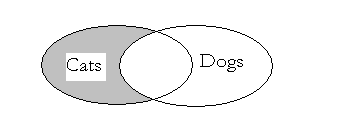
Example of Boolean logic:
Cats AND Dogs

Cats OR Dogs

Cats NOT Dogs
4)
Beyond
keywords
a.
The
basic techniques for refining your results are to search for unique phrases and
to include or exclude terms. A few
tricks common to many of the search engines are worth remembering.
i.
“
” Use quotes to surround words to be kept together in their specified
order. This is also known as a phrase search
ii.
+
Use the plus sign in front of a word to insure the word appears in all hits. Do
not leave a space between the operator (+) and your search term. You do need a space between search terms.
iii.
–
Use the minus sign in front of a word to insure it does not appear in hits. Do not leave a space between the operator (-)
and your search term. You do need a
space between search terms.
5)
Basic
Search Tips
a.
Broaden
your search using Boolean OR.
b.
Narrow
your search using Boolean AND or NOT.
c.
Alter
your search terms.
d.
Use
the plus sign, the minus sign, and quotes to refine your search.
e.
Limit
your search to particular field such as title, URL, or Internet domain.
f.
Beware:
just because it’s in print and on the Web doesn’t mean it’s true. You need to evaluate what you find on the
Internet just as you would evaluate other information that comes to you from
unfamiliar sources.